
Storage cleaner for Android

Free up space the honest way.

ClearNest shows you what's really taking up room on your phone — duplicate photos, large videos, and WhatsApp media — and lets you decide what goes. Everything is scanned on your device, and your files are never uploaded.

  • Free, with ads
  • No account needed
  • Android 8.0 and up
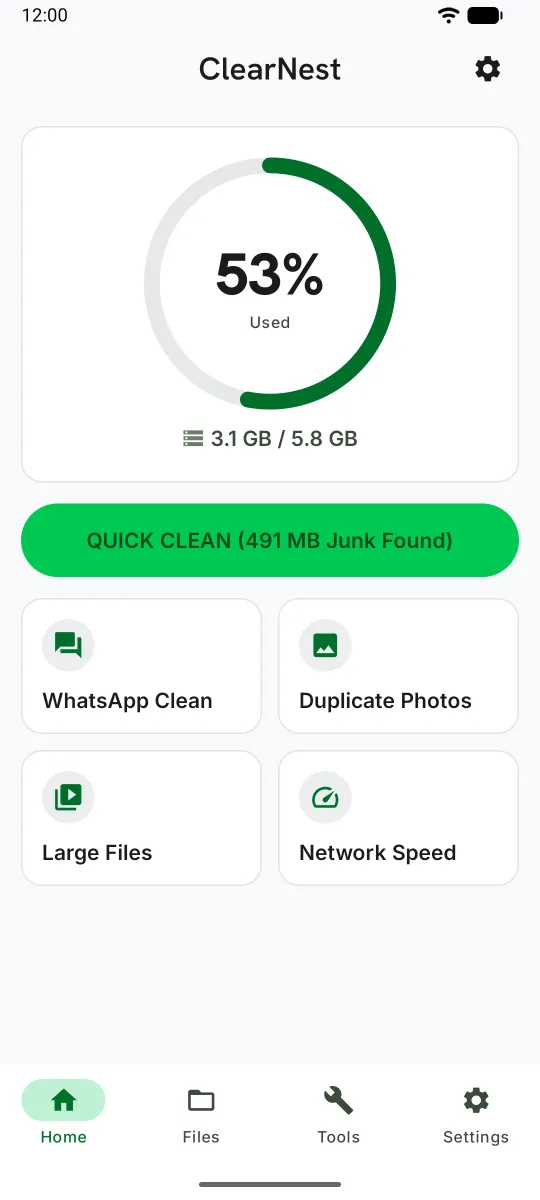
ClearNest home screen showing how much storage is used, with a Quick Clean button and cleaning tools

You review. You decide.Nothing is deleted until you tap Clean.

What ClearNest does

Focused tools that show you what's really on your phone — and leave the decisions to you.

  • Junk Clean

    Finds ClearNest's own cache and photos and videos over 50 MB. With All Files Access, which Quick Clean asks you to turn on in Android settings, it also looks through your phone for cache, thumbnail, temporary and log files, unfinished downloads, installers, and empty folders. You confirm before anything is deleted.
  • Duplicate & Similar Photos

    Exact duplicates are matched by their file contents, not just their names, and the highest-resolution copy is marked Keep. Similar shots are grouped side by side so you can pick your favorite — they're never selected for you.

  • Large Files

    Lists photos and videos over 50 MB, biggest first. With All Files Access, which you can allow or decline, it also lists other large files, such as ZIP archives, PDFs, and audio.

  • WhatsApp Clean

    Finds WhatsApp photos and videos saved on your phone and groups them by type. With All Files Access, which you can allow or decline, it can also find voice notes and stickers. You choose which categories to clear.

  • Network Speed Test

    Check your download speed and ping in a few seconds. ClearNest doesn't run an upload test. The test connects to public servers run by Google and Cloudflare.

  • Storage Overview & Reminders

    If you allow notifications, ClearNest can show your storage in the notification bar and send reminders based on real measurements from your phone. Turn either off in Settings; the Privacy Policy has the details.

How it works

Three steps. You stay in control the whole time.

  1. Step 1: Scan

    Open ClearNest and allow access to your photos and videos. The scan runs entirely on your device.

  2. Step 2: Review

    See what was found, with the size of each item. Check the items you want to remove; uncheck the rest.

  3. Step 3: Clean

    Tap Clean when you're ready — nothing is removed before that. Deleted files can't be restored, so give the list a quick look first.

See it in action

Real screens from the app.

ClearNest home screen with a storage usage gauge and shortcuts to each cleaning tool
Your storage at a glance
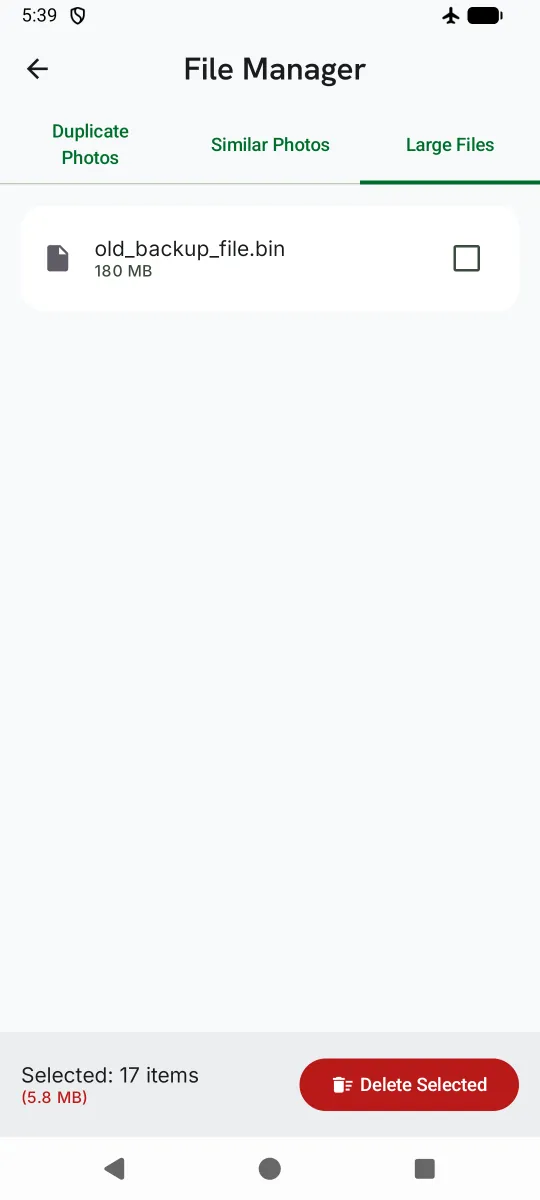
ClearNest File Manager with tabs for duplicate photos, similar photos, and large files, and a Delete Selected button
Duplicates, similar photos, and large files in one place

Privacy

Your files stay on your phone.

ClearNest scans, compares, and cleans locally. There's no account, and your photos and files are never uploaded.

  • On-device scanning

    Photos are compared right on your phone. Your photos, files and scan results aren't uploaded.

  • No account, ever

    No sign-up, no login, no email address.

  • What the app asks for

    Photos and videos, to find duplicates and large videos. Notifications, for reminders and a storage overview you can turn off. All Files Access, which Quick Clean asks you to turn on in Android settings, to look through your phone for cache, temporary files, installers, empty folders, and WhatsApp voice notes and stickers; you can say no. Usage Access (optional) and your app list, only to read how much cache other apps hold; it is shown, never counted as cleanable, and stays on your phone. No camera, microphone, contacts, or location access.

  • What goes online

    Your files don't. ClearNest connects to the internet to show ads, measure usage, crashes and diagnostics, receive settings and push messages, and run the Network Speed Test. Some of this starts before you make a consent choice, and diagnostic reports are sent even if you decline — the app has no setting to turn them off. The Privacy Policy lists what is sent.

  • Free, with ads

    ClearNest is free and supported by ads from Google AdMob: when you open or return to the app, at points such as when a cleanup finishes, and inside some screens. The Privacy Policy lists exactly what our ad and analytics services receive.

Read the full Privacy Policy

Speaks your language

The ClearNest app is available in 9 languages. It follows your phone's language automatically, or you can choose one in Settings.

  • English
  • Español
  • Português
  • Bahasa Indonesia
  • हिन्दी
  • Français
  • Deutsch
  • Tiếng Việt
  • Italiano

This website is currently available in English only.

Frequently asked questions

Can ClearNest clear other apps' caches?

No. Android doesn't let a regular app clear other apps' private caches, and ClearNest doesn't pretend otherwise. It clears its own cache, plus files you choose from your phone's shared storage — like duplicate photos, large videos, and WhatsApp media, and, if you allow All Files Access, cache, temporary files, and old installers found across your phone. If you turn on Usage Access, ClearNest can show how much cache other apps hold and point you to their storage pages, but it doesn't clear them or count them as cleanable. To clear another app's cache, go to your phone's Settings > Apps.

Does ClearNest upload my photos or files?

No. Scanning, duplicate detection, and cleanup all happen on your device, and your photos and files are never uploaded. ClearNest does use the internet for ads, usage statistics, crash and diagnostic reports, remote settings, push messages, and the Network Speed Test. Those services receive device identifiers (in some cases including your Google Advertising ID) and technical details, never your files. Diagnostic reports are sent even if you decline the consent form, and the app has no setting to turn them off. The Privacy Policy has the details.

Why would I give it All Files Access?

You don't have to. ClearNest explains it on a screen first, and you turn it on yourself in Android settings; you can say no. Quick Clean shows the explanation again while it is off. With it, ClearNest looks through your phone's shared storage for cache, thumbnail, temporary and log files, unfinished downloads, installers, empty folders, and WhatsApp voice notes and stickers. It reads names, sizes, dates and folders on your phone only and doesn't open your photos or documents. Without it, ClearNest scans only what Android shows it through your photo and video permissions, plus its own cache. Files Quick Clean finds this way are deleted right away, not moved to a recycle bin, and you confirm first. All Files Access is available on Android 11 and later.

Can I undo a cleanup?

Sometimes. On Android 11 and later, photos and videos you delete go to the system Trash for about 30 days, and you can restore them from there. Files Quick Clean finds in shared storage are deleted right away, not moved to the Trash, and we can't restore them; you confirm first. Nothing is deleted until you review the list and tap Clean. For photos you can't replace, keep a separate backup, such as a cloud photo backup.

What's the difference between duplicate and similar photos?

Duplicates are exact copies with identical file contents, so they're selected for you, with the highest-resolution copy marked Keep. Similar photos, like several shots of the same scene, are matched visually. That's less exact, so they're never selected for you — you choose which ones to remove.

Will ClearNest make my phone faster?

ClearNest frees up storage space. It doesn't boost your processor, memory, battery, or network. If your phone was struggling because storage was almost full, more free space can help — but we won't promise a speed-up.

Is ClearNest free? Does it show ads?

ClearNest is free to download and supported by ads. There are no in-app purchases. In regions where it's required, such as the EEA and UK, you can review your ad consent choices any time in Settings → Privacy options.

Which Android versions are supported?

Android 8.0 or later. What ClearNest can find depends on your Android version and permissions. On Android 11 and later, old APK installers, large non-media files, empty folders, and WhatsApp voice notes and stickers need All Files Access, which you can decline. WhatsApp photos and videos need Android 10 or later. On Android 14 and later, if you share only selected photos and videos, ClearNest scans only those.

See what's really on your phone.

Get ClearNest on Google Play — free, with ads. No account, no sign-up: just open it and scan.

Get it on Google Play
  • Free, with ads
  • No account needed
  • Android 8.0 and up